Building a PromptOps Pipeline: From Git to Deployment
· 13 min read TL;DR
In the previous post I argued for treating prompts as governed data assets. This is the working implementation — every layer of the PromptOps stack, with code:
- Storage — YAML schema with required metadata
- Registry — a
Promptdataclass +load_prompt(id)loader, packaged once for Lambda Layer + Glue--extra-py-files - CI/CD — schema validator + behavioral eval, wired to GitHub Actions, blocking merges on failure
- Runtime — Lambda + Glue examples using the same import path
- Observability —
log_prompt_event()helper emitting structured JSON for every invocation - Deploy — Serverless Compose orchestrating Layer publish + Lambda + Glue in one command
Code: github.com/raguvindtharanitharan/promptops.
A working slice, not a finished product
This isn’t a complete production platform. Drift detection, real-model evaluations, and dashboards still need to be built. But it’s a working slice that runs locally, validates on every PR, and deploys to AWS in one command. That’s the credible foundation — and the part most teams skip when they say they’re “doing PromptOps.”
The repo follows the same architecture as the serverless data platform piece. service_core/ becomes promptops_core/. The same Lambda Layer + Glue ZIP pattern carries the shared code. The same Serverless Compose orchestration ties it together. If you read that piece, this one should feel like an extension of the same architectural discipline applied to a new asset class.
The structure is the six layers from the previous PromptOps article, now in code:
1. Storage         — prompts/ directory of YAML files
2. Registry        — promptops_core/ Python module, loads + serves
3. CI/CD           — validate_prompts.py + eval_prompts.py + GitHub Actions
4. Runtime         — Lambda + Glue consume the registry
5. Observability   — log_prompt_event() emits structured JSON per call
6. Deploy          — Serverless Compose deploys it all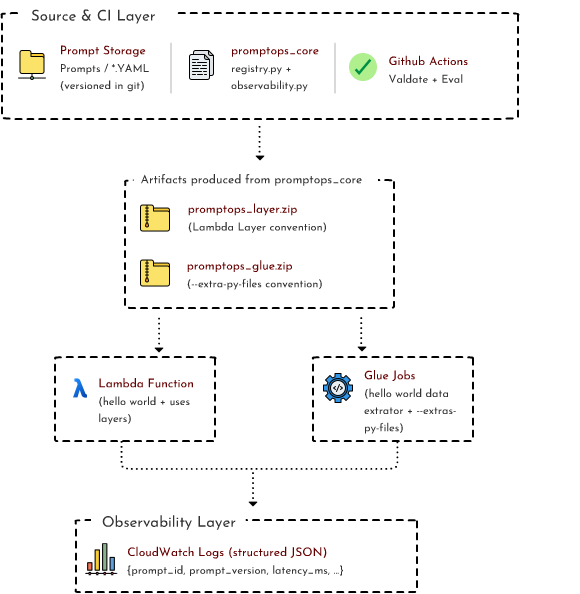
I’ll walk through each in order.
1. Storage — prompts as YAML
Prompts live in version control as YAML files, organized by domain:
prompts/
└── customer_support/
    └── intent_classifier.yaml
Each file is a self-contained record:
id: customer-support.intent-classifier
version: 2
owner: data-platform-team
model: claude-3-5-sonnet
parent: 1
tags:
  - classification
  - customer-support
metrics:
  baseline_accuracy: 0.94
  cost_per_call_usd: 0.003
template: |
  You are a customer support intent classifier.
  Given the user message and the previous conversation context,
  classify the intent into exactly one of:
  - billing      (questions about charges, invoices, refunds)
  - technical    (product not working, errors, bugs)
  - sales        (pricing, plans, upgrades, new accounts)
  - retention    (cancellation, downgrade, dissatisfaction)
  - other        (anything that doesn't fit above)
  Respond with only the single category label, lowercase, no
  punctuation or explanation.
created: 2026-04-15
updated: 2026-05-01
Why YAML, not JSON or code? Three reasons:
- Multi-line strings. YAML’s
|block lets the prompt template breathe. JSON requires\nescapes; Python source requires triple-quoted strings inside a class. Neither survives diff review well. - Schema without code. Anyone can edit a YAML file and submit a PR. Product managers, content writers, even legal can review prompt changes. PromptOps governance shouldn’t gatekeep on engineering language.
- Naturally diff-friendly. Reviewers see exactly which line of the template changed between version 1 and version 2.
The required fields aren’t decorative. Each one closes a specific failure mode I’ve watched teams hit:
| Field | Closes the failure mode where… |
|---|---|
id | Two teams independently named their prompt the same thing |
version | A prompt change broke prod, and rolling back the deploy didn’t help |
owner | Nobody knew who could approve a change |
model | The same prompt was secretly running on three different models |
parent | Lineage was lost between iterations |
tags | Search by domain became impossible past 50 prompts |
metrics | ”Accuracy” was discussed but never measured |
Validation enforces these at PR time. No prompt reaches main without them.
2. Registry — same import, two runtimes
The registry is one Python module (promptops_core/) that loads prompts and returns immutable Prompt objects:
# promptops_core/registry.py
from dataclasses import dataclass, field
from pathlib import Path
from typing import Any
import yaml

PROMPTS_DIR = Path(__file__).resolve().parent.parent / "prompts"


@dataclass(frozen=True)
class Prompt:
    id: str
    version: int
    owner: str
    model: str
    template: str
    tags: tuple[str, ...] = ()
    parent: int | None = None
    metrics: dict[str, Any] = field(default_factory=dict)


def load_prompt(prompt_id: str) -> Prompt:
    path = _id_to_path(prompt_id)
    if not path.exists():
        raise FileNotFoundError(f"Prompt '{prompt_id}' not registered")

    data = yaml.safe_load(path.read_text())
    return Prompt(
        id=data["id"],
        version=data["version"],
        owner=data["owner"],
        model=data["model"],
        template=data["template"],
        tags=tuple(data.get("tags", [])),
        parent=data.get("parent"),
        metrics=dict(data.get("metrics", {})),
    )
Three design choices worth flagging:
@dataclass(frozen=True). A loaded prompt is immutable. Callers can’t mutate the cached version and accidentally pollute downstream consumers. The “prompts as data assets” thesis shows up at the type level.- Tuples instead of lists for tags. Frozen dataclasses require hashable fields. YAML lists get coerced to tuples on the way in.
- Loud failure on miss. Missing prompt id raises
FileNotFoundError. No silent fallbacks, no “default prompt” — a missing id is a programmer error, surfaced at the point of failure.
This is the load side. The publish side — packaging — is the part that earns the “two runtimes” claim.
The build_artifacts.py script produces two ZIPs from the same source:
dist/promptops_layer.zip— Lambda Layer convention (python/promptops_core/,python/prompts/,python/yaml/)dist/promptops_glue.zip— Glue--extra-py-filesconvention (flat:promptops_core/,prompts/,yaml/)
Both contain the same Python module, the same prompt YAML, the same pyyaml runtime dep — packaged differently per runtime. Same source, two packagings. The pattern is identical to the serverless data platform piece — it just happens to apply equally well to prompts.
3. CI/CD — schema gate plus behavioral gate
Two scripts, two gates.
The schema gate (scripts/validate_prompts.py) checks every prompt YAML for required fields, types, and an id-matches-path consistency:
REQUIRED_FIELDS: dict[str, type] = {
    "id": str, "version": int, "owner": str,
    "model": str, "template": str, "tags": list,
}


def validate_file(path, prompts_root):
    data = yaml.safe_load(path.read_text())
    errors = []
    for field_name, expected_type in REQUIRED_FIELDS.items():
        if field_name not in data:
            errors.append(f"{path}: missing field '{field_name}'")
        elif not isinstance(data[field_name], expected_type):
            errors.append(f"{path}: '{field_name}' must be {expected_type.__name__}")

    expected_id = _expected_id_from_path(path, prompts_root)
    if data.get("id") != expected_id:
        errors.append(f"{path}: id doesn't match path")
    return errors
The path-vs-id check is a small detail with outsized value. It catches the bug class where someone renames a file but forgets to update the id field, or vice versa. CI blocks the PR — the prompt’s identity stays consistent between filesystem and metadata.
The behavioral gate (scripts/eval_prompts.py) runs each prompt against test cases, computes accuracy, and fails the build if accuracy drops below baseline_accuracy declared in the prompt’s metadata:
def evaluate_prompt(prompt_id, eval_path):
    cases = yaml.safe_load(eval_path.read_text())["cases"]
    prompt = load_prompt(prompt_id)
    passes = sum(
        1 for case in cases
        if classify_stub(prompt.template, case["input"]) == case["expected"]
    )
    return passes / len(cases)


def main():
    for eval_file in sorted(EVAL_DIR.rglob("*.yaml")):
        data = yaml.safe_load(eval_file.read_text())
        prompt = load_prompt(data["prompt_id"])
        accuracy = evaluate_prompt(prompt.id, eval_file)
        baseline = prompt.metrics.get("baseline_accuracy")
        if baseline is not None and accuracy < baseline:
            return 1   # CI fails
    return 0
In the demo I stub the model with a keyword classifier so the eval runs without API keys. In real usage, classify_stub() becomes a Bedrock or Anthropic call, and the test cases come from a held-out evaluation set per prompt. The framework is identical either way — the only change is what’s behind the model boundary.
Both gates run in GitHub Actions on every PR:
# .github/workflows/validate.yml
jobs:
  validate:
    runs-on: ubuntu-latest
    steps:
      - uses: actions/checkout@v4
      - uses: actions/setup-python@v5
        with: { python-version: "3.10" }
      - run: pip install -e ".[dev]"
      - run: python scripts/validate_prompts.py
      - run: python scripts/eval_prompts.py
A failed schema check or a regressed eval blocks the merge. No prompt with missing metadata reaches main. No prompt that degrades accuracy ships to prod. The pipeline is the discipline.
4. Runtime — Lambda and Glue using the same import
Both runtimes consume the registry through the same import statement. That’s the architectural punchline:
from promptops_core.registry import load_prompt
from promptops_core.observability import log_prompt_event, EVENT_INVOKED, EVENT_COMPLETED
What changes is the packaging mechanic, invisible to the import.
Lambda consumes via Lambda Layer. The Layer ZIP unpacks at /opt/python/, so the runtime sees /opt/python/promptops_core/ and /opt/python/prompts/. Standard Python search path picks them up:
# examples/lambda/hello_world_lambda.py
import time
import json

from promptops_core.registry import load_prompt
from promptops_core.observability import (
    log_prompt_event, EVENT_INVOKED, EVENT_COMPLETED
)

PROMPT_ID = "customer-support.intent-classifier"


def handler(event, context):
    user_message = event.get("message", "")
    prompt = load_prompt(PROMPT_ID)
    request_id = getattr(context, "aws_request_id", "local")

    log_prompt_event(EVENT_INVOKED, prompt,
                     request_id=request_id,
                     user_message_length=len(user_message))

    start = time.perf_counter()
    intent = "billing"  # Stub — replace with model call
    latency_ms = int((time.perf_counter() - start) * 1000)

    log_prompt_event(EVENT_COMPLETED, prompt,
                     request_id=request_id,
                     latency_ms=latency_ms,
                     intent=intent)

    return {
        "statusCode": 200,
        "body": json.dumps({
            "prompt_id": prompt.id,
            "prompt_version": prompt.version,
            "intent": intent,
        }),
    }
Glue consumes via --extra-py-files. The Glue ZIP gets uploaded to S3 and referenced in the job’s DefaultArguments:
# examples/serverless.yml (excerpt)
HelloWorldGlueJob:
  Type: AWS::Glue::Job
  Properties:
    Command:
      ScriptLocation: s3://.../glue/hello_world_data_extractor.py
    DefaultArguments:
      "--extra-py-files": s3://.../glue-libraries/promptops_glue.zip
      "--service-name": hello-world
The Glue script imports the registry the same way:
# examples/glue/hello_world_data_extractor.py
import sys
from awsglue.utils import getResolvedOptions

from promptops_core.registry import load_prompt
from promptops_core.observability import (
    log_prompt_event, EVENT_INVOKED, EVENT_COMPLETED
)


def main():
    args = getResolvedOptions(sys.argv, ["JOB_NAME"])
    prompt = load_prompt("customer-support.intent-classifier")

    log_prompt_event(EVENT_INVOKED, prompt,
                     job_name=args["JOB_NAME"], runtime="glue")

    # ... process records, call model per row ...

    log_prompt_event(EVENT_COMPLETED, prompt,
                     job_name=args["JOB_NAME"],
                     runtime="glue",
                     records_processed=0)
Identical imports, identical patterns. The job code doesn’t know which runtime it’s in. That’s the point.
5. Observability — one event helper, every invocation
Every prompt call emits at least one structured event. The schema is small and consistent:
# promptops_core/observability.py
import json
import sys

EVENT_INVOKED = "prompt_invoked"
EVENT_COMPLETED = "prompt_completed"
EVENT_FAILED = "prompt_failed"


def log_prompt_event(event_type, prompt, **extra):
    payload = {
        "event": event_type,
        "prompt_id": prompt.id,
        "prompt_version": prompt.version,
        "prompt_owner": prompt.owner,
        "prompt_model": prompt.model,
    }
    payload.update(extra)
    print(json.dumps(payload), file=sys.stdout)
Five required fields, plus arbitrary extras (latency_ms, tokens, error, request_id, runtime). Every invocation, every runtime, same shape.
Why this matters concretely:
- CloudWatch Logs Insights queries become trivial:
filter prompt_id = "customer-support.intent-classifier" and prompt_version = 2. No regex parsing of free-form strings. - Drift detection (Phase 4) reads these events directly — no separate metric pipeline needed.
- Per-prompt cost reporting: aggregate
tokensfield byprompt_id, multiply by model cost, finance dashboard done. - Triage: when a model output looks wrong, the
request_idlets you find the exact prompt + version + invocation context in one query.
The discipline is: never call a prompt without logging the prompt id and version with it. The helper makes that the path of least resistance — drop in two lines, every call is traceable forever.
6. Deploy — one command, two services
Deployment uses Serverless Compose, the same orchestration pattern as the serverless data platform piece:
# serverless-compose.yml
services:
  promptops-core:
    path: ./promptops_core
  promptops-examples:
    path: ./examples
    dependsOn: promptops-core
promptops-core runs first. Its serverless.yml:
- Calls
python ../scripts/build_artifacts.py(build hook, before package) - Publishes the Lambda Layer from
dist/promptops_layer.zip - Uploads
dist/promptops_glue.zipto S3 (after deploy) - Exports the Layer ARN via CloudFormation outputs
promptops-examples runs second. Its serverless.yml:
- Uploads the Glue script to S3 (before deploy)
- Defines the
hello-worldLambda, attached to the Layer ARN imported frompromptops-core - Defines the Glue job, referencing the Glue ZIP via
--extra-py-files
A single command deploys everything, in dependency order:
npm run deploy:devWhat this gives you:
- One source-of-truth pipeline. Prompt YAML changes → CI runs both gates → if both pass, merge → deploy bumps the Lambda Layer version → all consumers pick up the new version on their next deploy.
- Versioning is deploy-time, not runtime. A Lambda function is pinned to a specific Layer version. Rolling back the deploy rolls back the prompt — the bug class from the previous post (rolling back code without rolling back the prompt) goes away.
- Same artifact serves Lambda and Glue. Update the prompt once, both runtimes get it. No drift between “the Lambda version” and “the Glue version” of a prompt.
What I’ve stopped doing in PromptOps repos
Five patterns I’ve stopped tolerating, one for each of the gaps the discipline closes:
- Skipping the schema validator on small repos. Even with one prompt, the validator runs in 100ms and prevents the future bug where someone forgets
ownerand ships a 50-line YAML that nobody can support. - Stubbing eval until “we have a real model.” Stub it now with anything deterministic. The eval scaffold matters more than the eval contents — once teams see CI fail on accuracy, they care about accuracy.
- Inline prompts in handler code. I’d rather see a missing import than a string literal in a Lambda. Make the registry the only path.
- One repo without a clear blast radius. If multiple teams own prompts, multiple repos. If one team, one repo. Mixing them creates cross-team approval bottlenecks no PromptOps tool can solve.
- Treating observability as optional. If
log_prompt_eventisn’t called, the entire stack is invisible at runtime. Make it a code-review requirement on the consumer side.
What’s left
This is a working slice. Phase 4 — coming in the next post — adds:
- Drift detection — read live invocation events from CloudWatch, compare distributions (cost, latency, output mix) against baselines from prompt metadata, alert on regressions
- Behavioral eval against real models — replace the stub classifier with a Bedrock or Anthropic client, generate synthetic test cases per prompt, track accuracy across versions
- CloudWatch dashboards — pre-built dashboards consuming the structured events, queryable by
prompt_id+prompt_version - Multi-tenant prompt registries — when one team’s prompts shouldn’t be visible or editable by another, the registry needs scopes
What I’m exploring next: agent integration. When a prompt is composed and called by an autonomous agent rather than a deterministic Lambda, the observability discipline matters more, not less. The volume goes up two orders of magnitude. The same event schema scales. The same versioning discipline scales. The platform is the foundation; agents are what sit on top.
Build the platform first. Then make it smart.
Code: github.com/raguvindtharanitharan/promptops
Previous in this series:
- Structuring a Serverless Data Platform on AWS — the architectural pattern this builds on
- PromptOps: The DataOps Playbook for Prompts — the argument this implements